Gateway 960 User Manual Page 78
- Page / 157
- Table of contents
- TROUBLESHOOTING
- BOOKMARKS

- Contents 3
- iii 5
- Checking Out 7
- Your Gateway 7
- Hot-swap drives 9
- PCI card fan 9
- Interior 11
- System board 12
- Right side 13
- Getting Help 14
- Setting Up Your 15
- Setting up the hardware 16
- Protecting from power source 17
- Line conditioners 18
- Starting your server 19
- Off The server is turned off 20
- Turning off your server 21
- To restart your server: 22
- Maintaining Your 25
- Caring for your server 26
- Protecting your server from 28
- Managing hard drive space 29
- Using Disk Cleanup 30
- 3 Click the Tools tab 31
- 4 Click Check Now 31
- 7 Click OK 31
- Defragmenting the hard drive 32
- Backing up files 33
- Cleaning your server 34
- Cleaning the keyboard 35
- Cleaning the screen 35
- Cleaning the tape drive 35
- Cleaning the mouse 36
- Preparing for system recovery 38
- 4 Click the Tools tab 39
- System administration 42
- Monitoring case access 43
- To view the event log: 43
- Install hardware drivers 44
- Install programs 44
- View server documentation 44
- Installing 45
- Components 45
- Selecting a place to work 46
- Gathering the tools you need 46
- Opening the server case 48
- Closing the server case 51
- 8 Lock the front cover 52
- Installing drives 53
- Installing a media drive 54
- Hard drive screws 56
- 6 Go to Step 10 57
- Installing a hard drive 61
- Installing memory 64
- To install or replace memory: 65
- PCI slot Description 66
- Card retention 69
- Release lever 69
- Installing a processor 71
- 5 Remove the heat sink 72
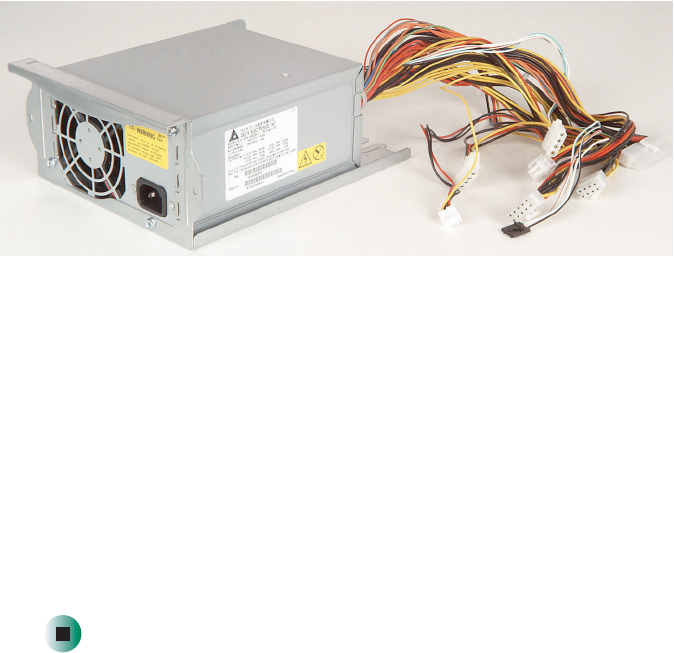
- Replacing the power supply 76
- Replacing the SCSI backplane 79
- Thumbscrew 82
- 15 Reinstall the fan 84
- Replacing the system board 85
- Replacing a fan 88
- Replacing the CMOS battery 90
- Using the BIOS 93
- Setup Utility 93
- 1 Restart your server 94
- 3 Select one of these menus: 94
- Updating the BIOS 95
- Resetting the BIOS 96
- Resetting BIOS passwords 97
- Safety guidelines 100
- Error messages 101
- Chapter 6: Troubleshooting 102
- Troubleshooting 105
- Battery replacement 106
- Beep codes 106
- CD drive 108
- Cleaning CDs 109
- Diskette drive 109
- Expansion cards 110
- File management 110
- Hard drive 111
- Internet 113
- Keyboard 114
- Modem (telephone dial-up) 115
- 1 Close all open programs 117
- The color is not uniform 118
- The mouse does not work 119
- Printer will not turn on 120
- Processor 121
- Telephone support 123
- Tutoring and training 125
- Specifications 127
- System specifications 128
- System board specifications 129
- Appendix A: 130
- Environmental specifications 131
- Video specifications 132
- Electronic specifications 133
- PCI interrupt routing 134
- Additional specifications 135
- BIOS Settings 137
- Appendix B: BIOS Settings 138
- Regulatory, and 141
- Legal Information 141
- Care during use 142
- Regulatory compliance 143
- FCC declaration of conformity 144
- Industry Canada (IC) 146
- Laser safety statement 147
- All Rights Reserved 148
- Trademark Acknowledgments 148
- 143 149
- 150
- 145 151
- 147 153
- 149 155
- A MAN 960 SYS GDE R1 12/02 157
Related products and manuals for Servers Gateway 960
 (16 pages)
(144 pages)
(114 pages)
(2 pages)
(16 pages)
(144 pages)
(114 pages)
(2 pages)
© 2020, manymanuals.com. All rights reserved. | 0.034 s |
 Manymanuals.com
 Manymanuals.de
 Manymanuals.fr
 Manymanuals.it
 Manymanuals.pl
 Manymanuals.cz
 Manymanuals.es
 Manymanuals-pt.com
Comments to this Manuals