Gateway 980 User Manual Page 72
- Page / 131
- Table of contents
- TROUBLESHOOTING
- BOOKMARKS

- Contents 2
- iii 4
- Checking Out 6
- Your Gateway 6
- Hot-swap drives 8
- Interior 10
- System board 11
- Right side 12
- Getting Help 13
- Setting Up Your 14
- Setting up the hardware 15
- Protecting from power source 16
- Line conditioners 17
- Starting your server 18
- Turning off your server 20
- Maintaining Your 22
- Caring for your server 23
- Cleaning tips 24
- Cleaning the keyboard 24
- Cleaning the screen 24
- Cleaning the tape drive 25
- Preparing for system recovery 26
- System administration 27
- Install hardware drivers 29
- Install programs 29
- View server documentation 29
- Installing 30
- Components 30
- Selecting a place to work 31
- Gathering the tools you need 31
- Opening the server case 33
- 3 Unlock the front cover 34
- Thumbscrews 35
- Closing the server case 37
- 8 Lock the front cover 38
- Installing drives 39
- Installing an IDE drive 40
- 6 Go to Step 11 43
- Tape drive 45
- Installing a SCSI hard drive 47
- Installing memory 50
- To install or replace memory: 51
- PCI slot Description 52
- Card retention 55
- Release lever 55
- Installing a processor 57
- Replacing the power supply 62
- To replace the power supply: 63
- Replacing the SCSI backplane 65
- 15 Reinstall the fan 70
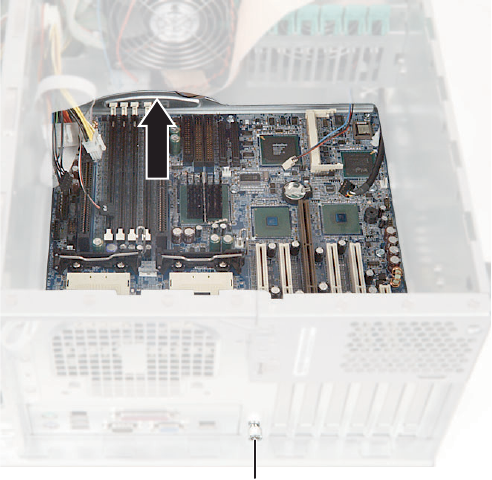
- Replacing the system board 71
- Replacing a fan 74
- Replacing the CMOS battery 76
- Using the BIOS 80
- Setup Utility 80
- 1 Restart your server 81
- 3 Select one of these menus: 81
- Updating the BIOS 82
- Resetting the BIOS 83
- Resetting BIOS passwords 84
- Troubleshooting 86
- Safety guidelines 87
- Error messages 88
- Chapter 6: Troubleshooting 89
- Beep codes 91
- CD drive 93
- Diskette drive 93
- Expansion cards 94
- Hard drive 94
- Internet 96
- Keyboard 97
- Modem (telephone dial-up) 97
- The color is not uniform 99
- Processor 100
- Telephone support 101
- Tutoring and training 103
- Specifications 104
- System specifications 105
- System board specifications 106
- Environmental specifications 107
- Video specifications 108
- Electronic specifications 109
- PCI interrupt routing 110
- Additional specifications 111
- BIOS Settings 112
- Appendix B: 113
- Regulatory, and 116
- Legal Information 116
- Appendix C: 117
- Regulatory compliance 119
- FCC declaration of conformity 120
- Laser safety statement 122
- 119 124
- 125
- 121 126
- 123 128
- 125 130
- 126 131
Related products and manuals for Servers Gateway 980
 (106 pages)
(128 pages)
(118 pages)
(138 pages)
(106 pages)
(128 pages)
(118 pages)
(138 pages)
 (148 pages)
(226 pages)
(188 pages)
(157 pages)
(16 pages)
(144 pages)
(114 pages)
(2 pages)
(148 pages)
(226 pages)
(188 pages)
(157 pages)
(16 pages)
(144 pages)
(114 pages)
(2 pages)
© 2020, manymanuals.com. All rights reserved. | 0.094 s |
 Manymanuals.com
 Manymanuals.de
 Manymanuals.fr
 Manymanuals.it
 Manymanuals.pl
 Manymanuals.cz
 Manymanuals.es
 Manymanuals-pt.com
Comments to this Manuals